Diffacto Download

An agent edited 47 files. 1 test changed in a fix.

Coding agents move fast and touch dozens of files at once. Diffacto records each step they take, flags edited tests and unexpected files, folds mechanical noise away, and checks whether a refactor changed the output.

For Macs with Apple silicon and macOS 15 or later. 14 days of every feature, with no account and no card. Windows and Linux apps are in testing; see Download.

Check what an agent changed

Pick a check below. Every step record, output check and clash scan runs on your Mac, with no code sent to our servers.

An agent's steps

Step 1 changed a test while fixing a bug, and a line it added was undone in step 2.

  • Claude Code
  • Cursor
  • Codex
  • VS Code
More details

Coding agents connected to Diffacto's MCP server record each step as they work: what they meant to do, the files they expected to touch, and a note. If an agent edits files without starting a step, Diffacto still groups the changes and flags those edits as outside any step. Snapshots live under refs/diffacto/ledger/ inside .git, so your branches stay untouched. Recording and diffacto ledger show are free; View ▸ Group Changes by Step in the app needs Pro.
Output checks

Under the reformat, one thing changes the database: the note column now has a default.

  • SQLite migrations
  • TypeScript
  • Java
  • Python AST
  • Helm
  • Kustomize
  • Custom
More details

Diffacto builds both sides of a Git change and compares the outputs side by side, marking each file Same output, Different output, or Not checked with the reason. Files whose output didn't change fold away with the mechanical edits. SQL migrations must run on SQLite; others are marked Not checked. Tools run only after you allow them, in a sandbox with no network. diffacto lens run is free; View ▸ Check Outputs in the app needs Pro.

Renames in merges

Your rename of compute_total was redone in their changes first, so the merge had no conflict.

  • Git merge driver
  • Conflict list
  • Undo Replay
More details

Run diffacto git install --merge-driver or turn it on in Settings ▸ Tools. Before merging or rebasing, Diffacto redoes verified identifier renames on the other side, never touching comments or strings and refusing if the new name collides or doesn't parse. The merge driver is free; when conflicts remain, the merge window (Pro) opens on a list of the conflicts left, and Undo Replay takes the replay back.

Clash warnings

You and Dana both changed computeTotal. You hear about it the same day, not at the merge.

  • Git
  • Perforce
  • Unity Version Control
More details

Turn on Clash Warnings per project in Settings ▸ Clash Warnings (Pro). A small helper in the menu bar compares your working tree against teammates' pushed Git branches, Perforce shelves or Unity Version Control branches every 5 minutes. Everything runs on your Mac, and your branches are never changed.

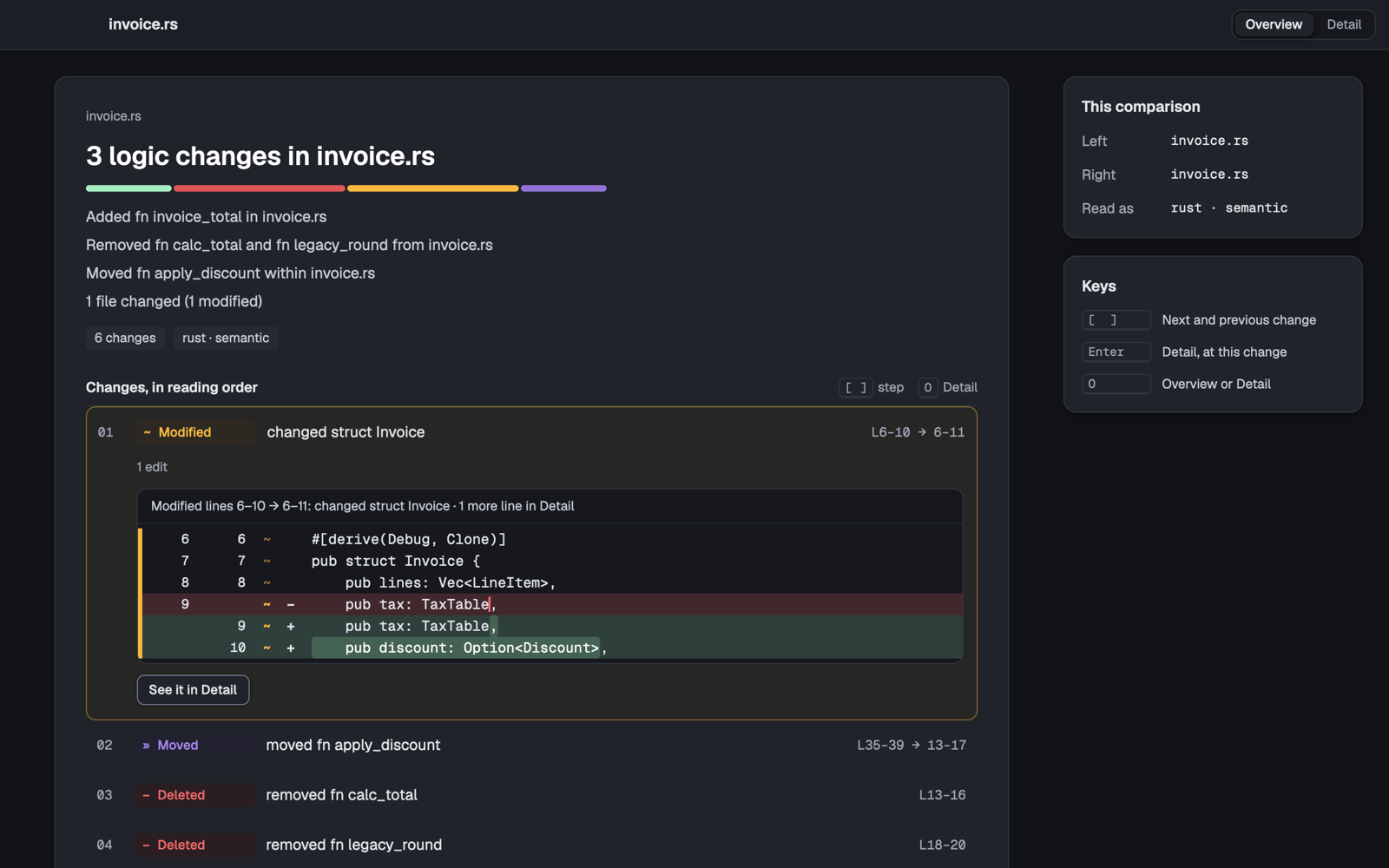
Diffacto's Overview of a change to invoice.rs, headed 3 logic changes: a changed struct with its edited lines shown, then a moved function and two removed functions, numbered in reading order.
In the appOverview lists logic changes in reading order first, with moves, renames and mechanical noise folded away.

Works with your coding agents and Git

  • MCP setup

    Connect Claude Code, Cursor, Codex and VS Code in Settings ▸ Tools, which shows what it will write before you confirm, or run diffacto mcp install (pass --print to preview first).

  • Grouping changes by kind

    Big changesets (up to 5,000 files) sort into Read closely, Tests, Mechanical, and Generated and lockfiles, folding mechanical renames out of your way. Opening changesets in the app needs Pro; the MCP output includes the same groups for free.

  • Git worktrees and Jujutsu

    Running parallel agents in worktrees? List every worktree in Open Changes…, compare two worktrees side by side (Pro), or run diffacto open --worktree NAME. Jujutsu (diffacto jj install) works too.

  • Live review handoff and notes

    When an agent calls request_review, Diffacto refreshes the changes window you already have open. Viewed marks persist across reopenings, a Since Viewed bar shows only new edits, and inline notes (Pro) stay attached as lines move.

$ diffacto ledger show
session: shop (2 steps)
1  fix the checkout race  fix · 2 files
   ! changed tests: tests/test_checkout.py
   ! unexpected files: tests/test_checkout.py
   ~ 1 line undone in step 2
   note: added a lock
2  drop the debug print   refactor · 1 file
   src/checkout.py (1 line)
All the details
  • Free vs Pro for coding agents. The MCP server, diffacto mcp install, step recording, diffacto ledger show, diffacto lens run, diffacto git install --merge-driver, and diffacto blame / bisect are all free with no time limit. In the app, Pro adds changeset and worktree windows, View ▸ Group Changes by Step, View ▸ Check Outputs, the merge window, inline review notes, History by Meaning, Clash Warnings, and Approvals (making an approval also needs Pro on the command line).
  • MCP tools. The server gives agents semantic diffs grouped by kind, step recording (start_step, end_step, checkpoint), request_review to open or refresh your review window with line notes you leave back, output checks (check_output, running only tools you have allowed), semantic blame and history, and clash checks (merge_radar, for projects where you turned Clash Warnings on).
  • Your branches stay untouched. Agent step snapshots live under refs/diffacto/ledger/ inside .git, taken through a copy of the index. Your working tree, staging area and branches are never modified, and diffacto ledger prune cleans up old sessions.
  • Your files stay on your Mac. Diffacto sends no analytics or crash reports, and your files stay on your Mac unless you make an encrypted share link or set up a cloud summary. Clash warnings fetch only from the Git, Perforce or Unity Version Control server your project already uses.

Try it on your next agent session

Every download starts with 14 days of every plan and pack, with no account and no card. After that, the CLI and MCP server stay free. Plans and prices are in the pricing section.

Every comparison runs on your own computer. Diffacto sends no analytics or crash reports, and never sends us file contents, names or paths.

For other teams